
Ever feel like planning an event is less like “hosting a party” and more like “defusing a bomb,” where one missed detail ruins everything?
To survive the high stakes of event management, you need a system that’s as flexible as it is rock-solid. Enter WpEvently, a dynamic WordPress plugin designed to turn the chaos of ticketing into an effortless, WooCommerce-powered breeze. While the core plugin is a professional powerhouse in its own right, its real magic happens when you tap into its ecosystem of add-ons and modular tools that scale alongside your growing business.
In this review, we’ll explore the most practical WooCommerce add-ons that event professionals rely on to deliver exceptional experiences.
How WPEvently Add-Ons Work Inside WooCommerce
Think of WpEvently and WooCommerce as best friends. Since they share the same cart, checkout, and payment system, everything stays exactly where you’d expect it to be.
The best part? Adding new tools won’t break your site or mess up your flow. These add-ons layer on top of what’s already working, keeping your business running like a well-oiled machine.
It’s all the power you need, without the technical headache.
For example, you want to install the Early Bird add-on for WpEvently. Let’s see the changes.
Before installing the addon, you can see that the event tickets only have quantity, price, and sale end time and date, but no start date and time for early bird.
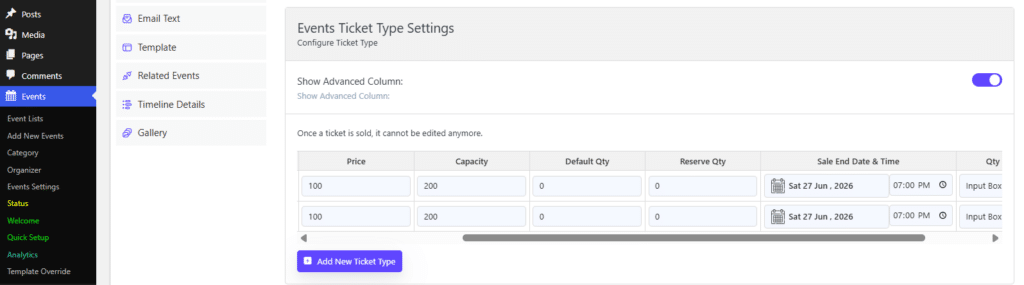
To see the changes, let’s install it.
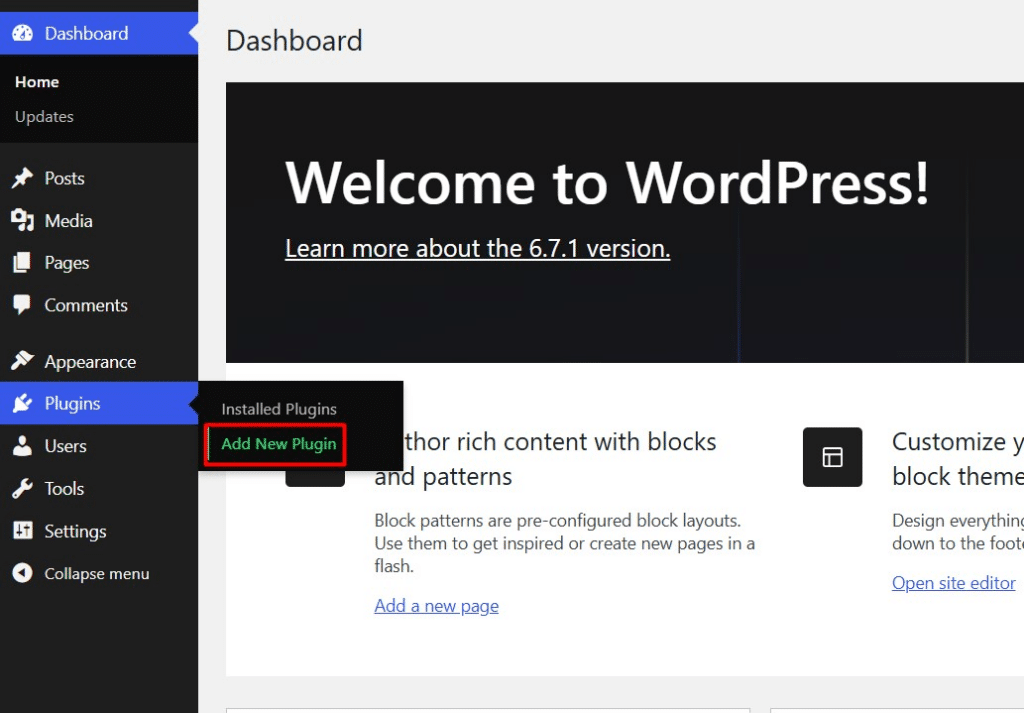
To install any add-on for WpEvently, go to Add New Plugins.
After purchasing any WpEvently add-on, you need to upload the add-on’s zip file.
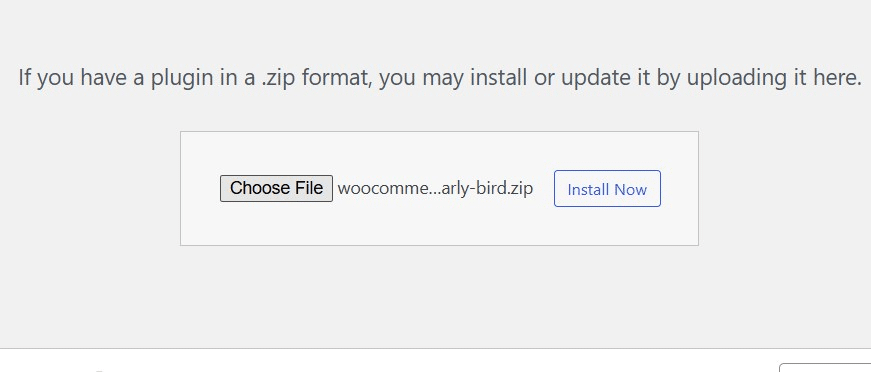
Once you have uploaded it, click Install Now and then activate the add-on.
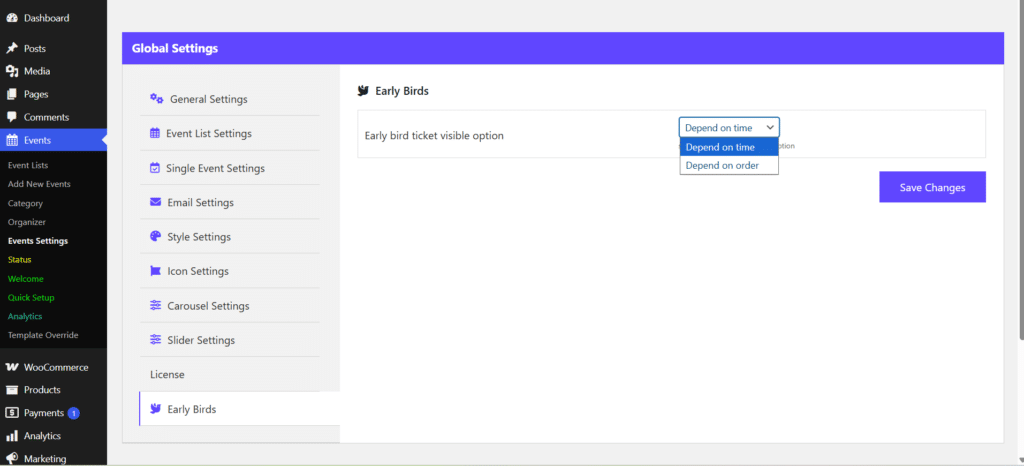
The early bird option tab will appear on the Event settings to select the early bird based on time or event.
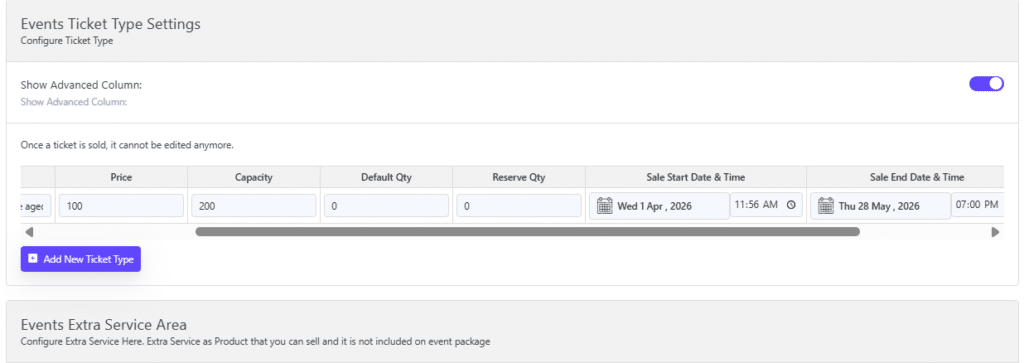
Now, when you check the price section of the event, you can see that there is a start date and time that appears after activating the early bird addon. This change does not affect any WooCommerce settings.
Well, you learn how an add-on works with WpEvently settings without affecting WooCommerce.
Let’s find out how each of the WpEvently add-ons makes your event management system awesome.
Add-On 1: Global Quantity Add-On
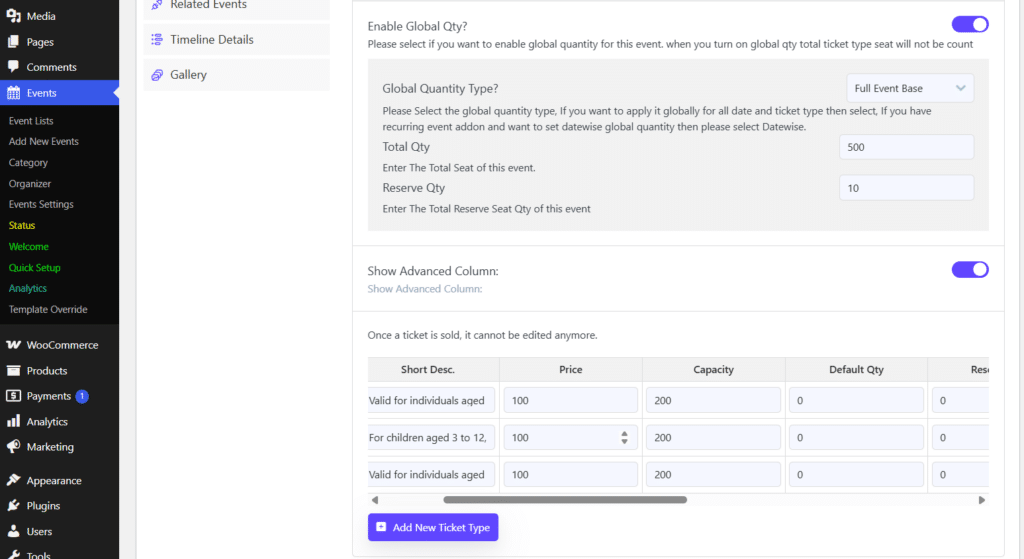
The Global Common Qty Addon for Event Manager is a premium extension for the WooCommerce Event Manager plugin by MagePeople.
Its primary purpose is to allow event organizers to set a shared (global) ticket pool for an event, rather than having separate stock limits for each individual ticket type.
Global Quantity Addon: Why You Need It
Managing ticket types separately is a common mistake that leads to overbooked venues and angry customers. Here is a simple breakdown of the risk and the solution.
1. The Risk: Why “Separate Counting” Fails
Without this addon, each ticket type has its own independent stock. This creates a math trap:
- Scenario: Your venue holds 400 people. You can create 200 “VIP” tickets and 200 “General Admission” tickets to cover your bases.
- The Disaster: If both sell out, you’ve sold 410 tickets for a 400-seat room.
- The Consequences: * Angry Crowds: Turning away paid guests at the door.
- Financial Loss: Forced refunds, high chargeback fees, and potential venue fines.
- Reputation Damage: Negative reviews that kill future ticket sales.
2. The Solution: How “Shared Quantity” Fixes It
The Global Quantity Addon replaces individual counters with one Master Pool that matches your actual venue capacity.
- How it Works: You set a single global limit (e.g., 400).
- The “One-Bucket” Logic: Every time a ticket is sold—whether it’s VIP, Student, or Early Bird—it subtracts from that same pool of 400.
- The Hard Stop: The moment the 400th ticket is sold, every ticket type instantly shows as “Sold Out.”
The Result
- Zero Overselling: You can never sell more than the venue holds.
- Automatic Sync: No manual math or stock movement required.
- Peace of Mind: You can offer as many ticket categories as you want, knowing the total headcount is always safe.
Add-On 2: Event Max–Min Quantity Limiting
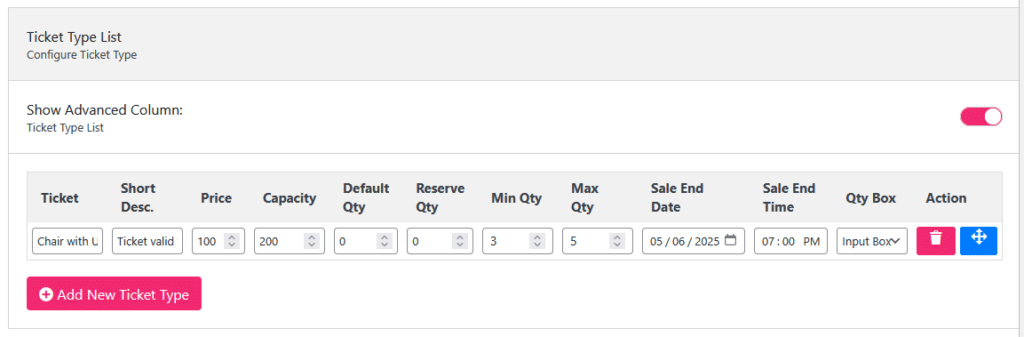
The Event Max-Min Quantity Limiting Addon is a companion plugin for WooCommerce Event Manager that allows organizers to control the exact number of tickets a customer can purchase in a single transaction.
1. The Problem: The “Bulk Buyer” Monopoly
Without purchase limits, your event is vulnerable to several “bulk buying” scenarios that can damage your brand and attendee experience:
- The Scalper Threat: A professional reseller buys 50% of your tickets the moment they go live, only to resell them at a 300% markup on third-party sites. Your fans stay home, and your event looks “sold out” when it isn’t.
- The Single-Buyer Lockout: A single large corporation or group buys every available “VIP” or “Front Row” ticket, preventing your most loyal individual fans from ever having a chance at a premium experience.
- The “Empty Seat” Risk: If one person buys 50 tickets but their group’s plans change last minute, you end up with a massive hole in your audience, even though the event was technically “full.”
- The Under-Filled Table: If you sell tickets for an 8-person gala table individually, and someone buys just 1 ticket, you are left with 7 seats that are harder to sell to other groups.
2. The Solution: How Max–Min Rules Ensure Fairness
Setting “guardrails” at checkout gives you total control over who buys your tickets and in what quantity.
1. Maximum Limits (The “Scalper Stopper”)
- Wider Distribution: By limiting sales to 4 or 6 tickets per person, you ensure tickets go to dozens of unique families rather than one or two bulk buyers.
- Blocks Resellers: Scalpers need high volume to make a profit. Restricting them to 2 tickets per order makes it too difficult for them to corner your market.
- Protects VIP Access: You can limit premium seats to 1 or 2 per person, ensuring your best experiences are shared fairly among your community.
2. Minimum Limits (The “Group Optimizer”)
- Enforces Ticket Types: For “Table for 4” or “Couple’s Deals,” setting a Minimum of 4 or 2 ensures customers actually pay for the intended group size.
- Guarantees Profitability: If a workshop requires at least 5 people to be worth running, a minimum purchase rule prevents single-person bookings that are costly to host or cancel.
You can learn more about min-max quantity add-on from how to use min-max quantity limiting add-on.
Add-On 3: Marketplace / Frontend Submission
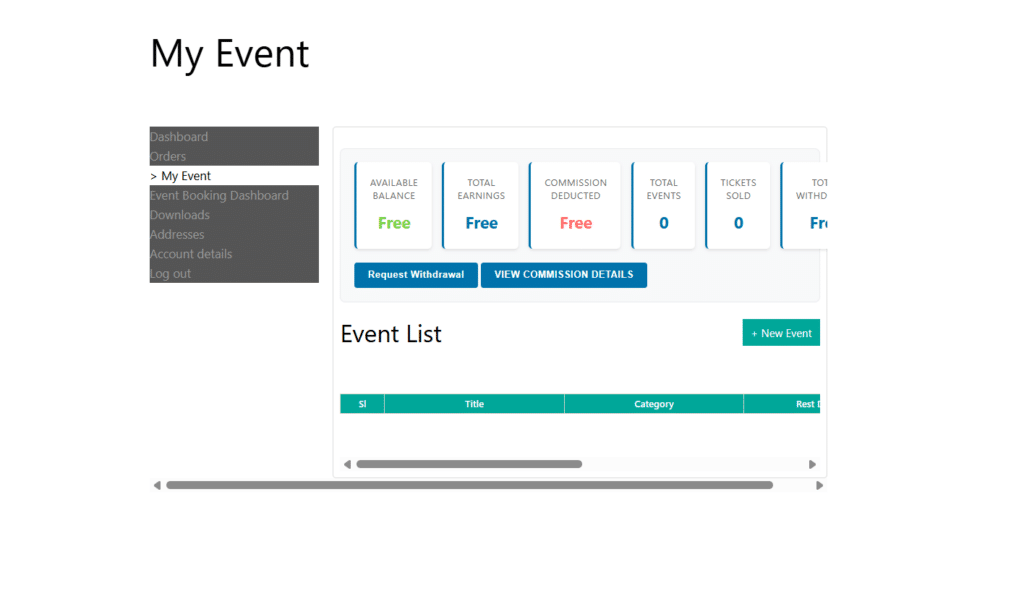
The Event Marketplace / Frontend Submit Addon for WooCommerce Event Manager is designed to turn your website into a multi-organizer event platform. It allows external organizers to submit and manage their own events directly from the frontend of your site, without needing access to the WordPress backend.
1. The Easy Frontend Workflow
Organizers manage everything without ever seeing the WordPress backend:
- Sign-Up: Users register as “Organizers” via a dedicated frontend page.
- Submit: They use a simple form to add event details, images, and ticket prices.
- Review: You can vet events before they go live or allow trusted users to auto-publish.
- Manage: Organizers get a private dashboard to track real-time sales and download attendee lists.
2. Building Your Marketplace Business
This addon is the “engine” that lets you scale by hosting other people’s events:
- Private Data: Organizers only see their own sales and attendees—never your site’s total earnings.
- Earnings Tracking: The system tracks balances for each organizer, making it easy to run a commission-based model.
- Payouts: Includes a professional withdrawal system where organizers can request their earnings once they reach a set limit.
- Hands-Off Growth: Your users provide the content while you provide the platform and keep a cut of the sales.
Add-On 4: Event QR Code
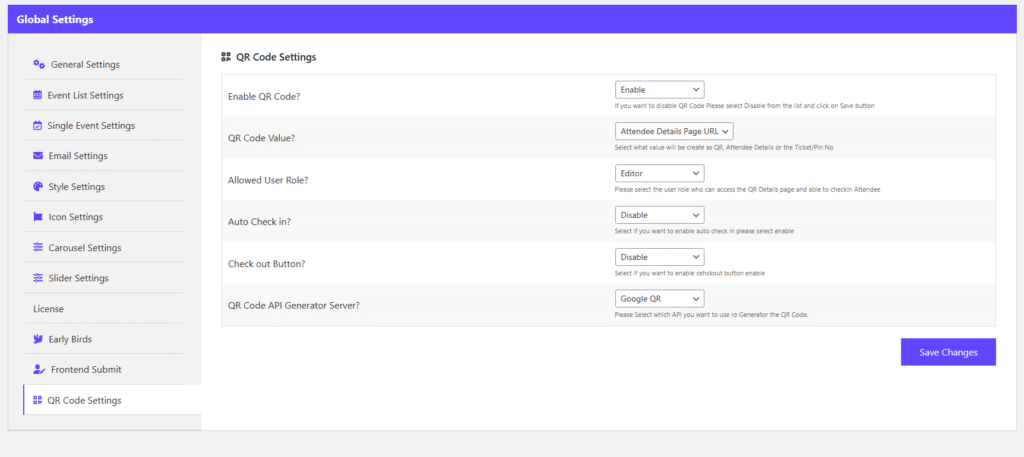
The WooCommerce Event QR Code Addon by MagePeople is a professional tool for managing attendee check-ins at your event venue. It automates the verification process by printing unique QR codes on PDF tickets that can be scanned with any smartphone.
1. The Problem: The Check-In Bottleneck
Manual check-ins are a nightmare for large crowds. Staff waste time flipping through pages of names, leading to:
- Human Error: Accidentally checking the wrong person or missing a name.
- Fraud: No way to instantly tell if a ticket is a duplicate or a fake.
- Long Queues: Frustrated guests and a delayed event start.
2. The Solution: Instant QR Validation
Scanning a QR code takes less than a second and removes the guesswork:
- Unique Identity: Every ticket gets an encrypted code that links directly to the attendee’s data.
- Real-Time Logic: The system instantly checks: Is this ticket real? and Has it been used?
- Visual Alerts: Staff see a clear Green (Valid) or Red (Already Used) status immediately.
3. The Advantage for Large Events
- No Extra Hardware: Volunteers use their own phone cameras—no expensive scanners needed.
- Multi-Gate Sync: All entrances stay synced. If a ticket is scanned at Gate A, it’s instantly flagged as “Used” at Gate B.
- Auto Check-In: Enable “Auto-Mode” for a non-stop “walking scan” that keeps lines moving rapidly.
- Live Stats: Watch your attendance climb in real-time from your dashboard so you know exactly when to start the show.
Add-On 5: Event Calendar Add-On
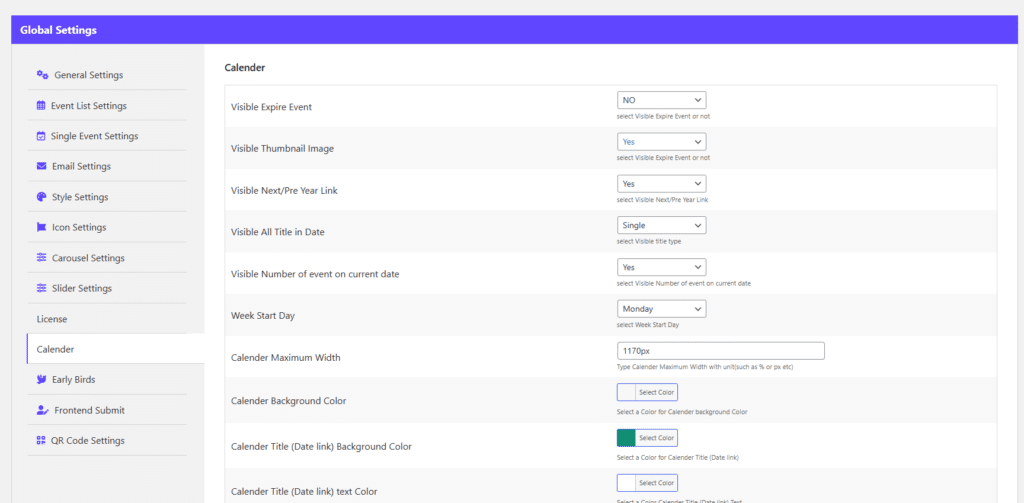
The WooCommerce Event Calendar Addon by MagePeople is a premium extension for the WooCommerce Event Manager plugin. It allows you to display your events in a professional, interactive calendar format, making it easier for customers to browse upcoming dates and book tickets directly.
1. Matching How Visitors Browse
Most people search based on their own free time (“I’m free next Saturday; what’s on?”).
- Stop the “Mental Math”: Lists force users to scroll and memorize dates. A calendar does the work for them.
- Easy Comparison: Users can see multiple events side-by-side to choose the one that fits their schedule best.
2. Faster Navigation
The calendar acts as a visual filter to speed up the booking process:
- Accidental Discovery: Users scanning for one date often spot and book other events they weren’t originally looking for.
- Hover & Decide: The “quick-peek” feature lets users see prices and times without leaving the page, reducing “click fatigue.”
- Direct Booking: One click on a date sends the user straight to the checkout, shortening the path to a sale.
3. Perfect for Recurring Events
For complex schedules, a calendar is the best organizational tool:
- Shows Consistency: Displays weekly classes or multi-day conferences clearly, making your brand look active and professional.
- Multi-Step Planning: Attendees can instantly see that “Part 1” is this week and “Part 2” is next week, helping them commit to the full series.
- Proof of Demand: Seeing “Sold Out” badges on past dates builds “FOMO” (fear of missing out) and encourages faster bookings for future dates.
Add-On 6: Book Events From Dashboard
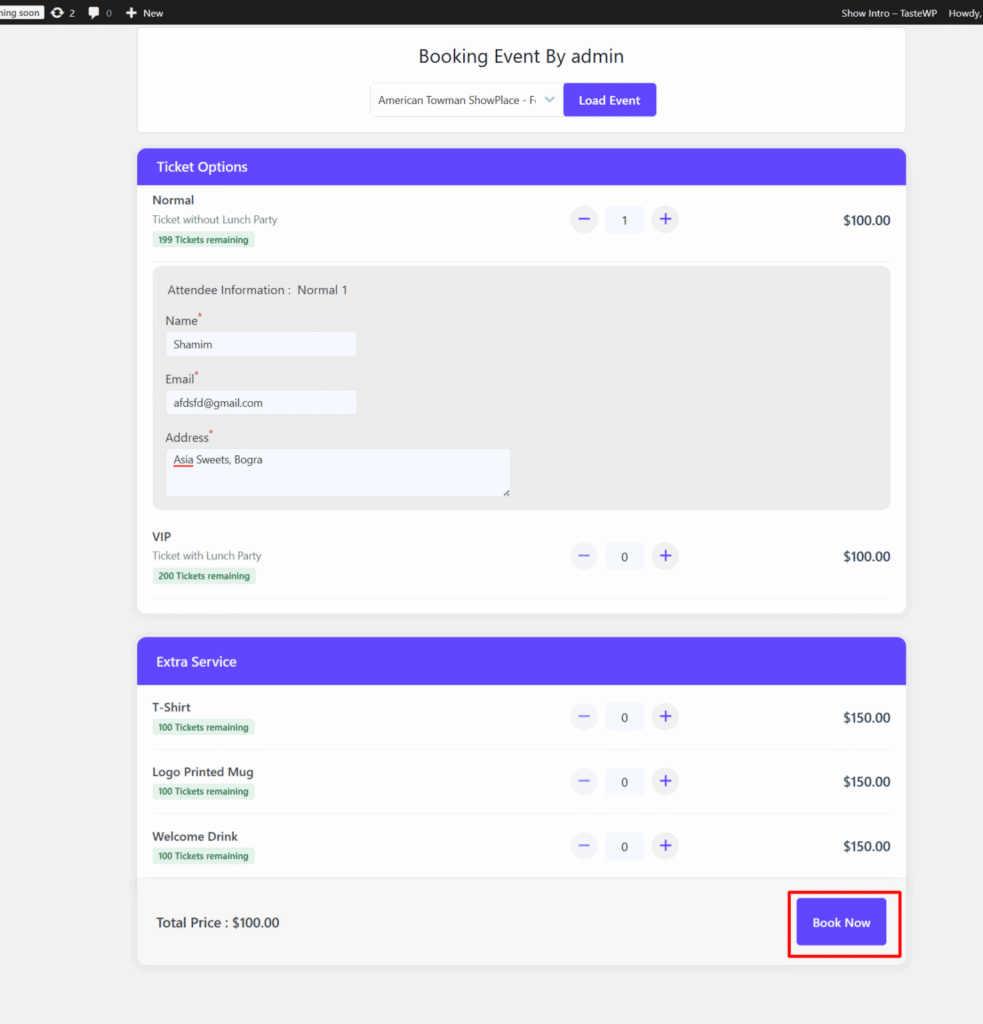
The Book an Event From Dashboard Addon (also known as the Backend Order Addon) is designed to give site administrators and event organizers the ability to manually process ticket bookings directly from the WordPress admin area. It transforms into a professional point-of-sale system, allowing you to process manual registrations as easily as online ones.
1. Why Offline Bookings Still Matter
Not every sale happens through a browser. High-value bookings often occur through traditional channels:
- Phone Reservations: Customers who want instant answers and immediate confirmation.
- Walk-In Sales: Handling “at-the-door” attendees who prefer to pay in person.
- VIP & Guest Lists: Manually adding speakers, sponsors, or media partners without a public checkout.
- Personal Touch: Providing a trusted booking experience for less tech-savvy clients.
2. Seamless Integration & Accuracy
The biggest risk of “offline” sales is losing track of your data. This addon fixes that by syncing everything in real-time:
- Unified Reporting: Manual bookings are processed as standard WooCommerce orders, keeping your sales and tax reports 100% accurate.
- Instant Inventory Sync: If an admin books 2 tickets from the backend, the website inventory updates immediately to prevent overselling.
- Automated Confirmations: Even offline guests get a professional experience the system auto-emails them a PDF ticket with a QR code.
- One Central List: No more merging spreadsheets. All attendees online or offline appear in one searchable, manageable dashboard.
Add-On 7: Email Reminder Add-On
The Event Email Reminder Addon for WooCommerce Event Manager is an essential tool for boosting event attendance and improving post-event follow-ups. It automates the entire communication cycle, ensuring your attendees are informed and engaged before, during, and after your event.
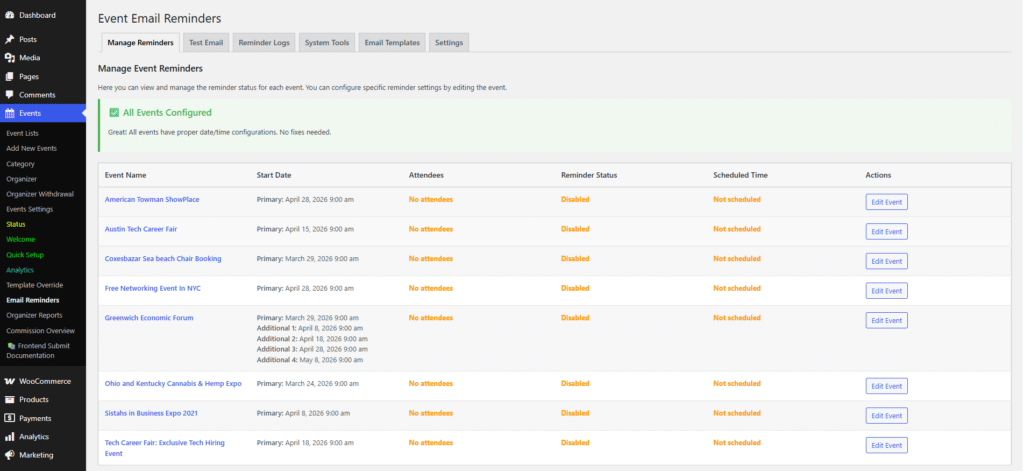
1. The Power of Pre-Event Automation
Stop chasing attendees manually. This addon handles the heavy lifting:
- Scheduled Triggers: Set up to 3 automated reminders per event to send days, hours, or minutes before the start time.
- Dynamic Personalization: Automatically insert names, event titles, and venue links into every email using placeholders.
- Custom Content: Use the HTML editor to send preparation guides, digital tickets, or “what to bring” lists exactly when guests need them.
2. Impact on Attendance Rates
Consistent communication is the best way to combat “no-shows”:
- Combat Forgetfulness: A timely 24-hour or 1-hour nudge significantly reduces the number of people who simply forget they registered.
- Build Anticipation: Regular touchpoints keep your event top-of-mind and build professional trust, making attendees more committed to showing up.
- Real-Time Updates: Instantly blast manual updates to your entire attendee list if there are last-minute venue or schedule changes.
3. Closing the Loop: Post-Event Follow-Ups
Keep the momentum going after the event ends:
- Collect Feedback: Automatically trigger emails to ask for ratings and testimonials while the experience is fresh.
- Share Resources: Send out slide decks, recordings, or “Next Steps” documents immediately after the session concludes.
Add-On 8: Early Bird Ticketing Discount
The Early Bird Pricing Addon for WooCommerce Event Manager is a powerful tool designed to drive ticket sales by offering time-based discounts. It allows organizers to create a sense of urgency and reward early purchasers with lower prices.
1. The Challenge: Late-Booking Logistics
Waiting for last-minute sales creates significant stress for organizers:
- Financial Risk: Without early revenue, covering upfront costs like venue deposits and catering is difficult.
- Attendance Guesswork: It’s nearly impossible to scale staff or resources when 60% of sales happen in the final 48 hours.
- Ad Fatigue: You end up spending more on “emergency” marketing to fill seats at the last minute.
2. How Early Pricing Drives Decisions
Early Bird rates use psychology to move customers from “maybe” to “purchased”:
- Real Urgency: Hard deadlines force a faster decision to save money.
- Loyalty Rewards: It gives your most engaged fans the best value, making them feel like VIP “insiders.”
- The Price Anchor: Once the discount ends, the “Standard” rate becomes the new fair market value, making early buyers feel they’ve secured a major win.
3. Strategic Advantages
- Immediate Cash Flow: Secure the capital needed for event logistics months in advance.
- Social Proof: High early sales allow you to announce “Early Bird Sold Out!”, building massive credibility and FOMO for remaining tickets.
- Set-and-Forget Tiering: Automatically transition prices from Super Early Bird $\rightarrow$ Early Bird $\rightarrow$ Regular as the event date approaches.
Add-On 9: Event Waitlist Add-On
The Waitlist Addon for WooCommerce Event Manager (WpEvently) ensures you never miss a potential sale when an event sells out. It automatically activates a subscription form when tickets are unavailable, allowing interested guests to join a waiting list.
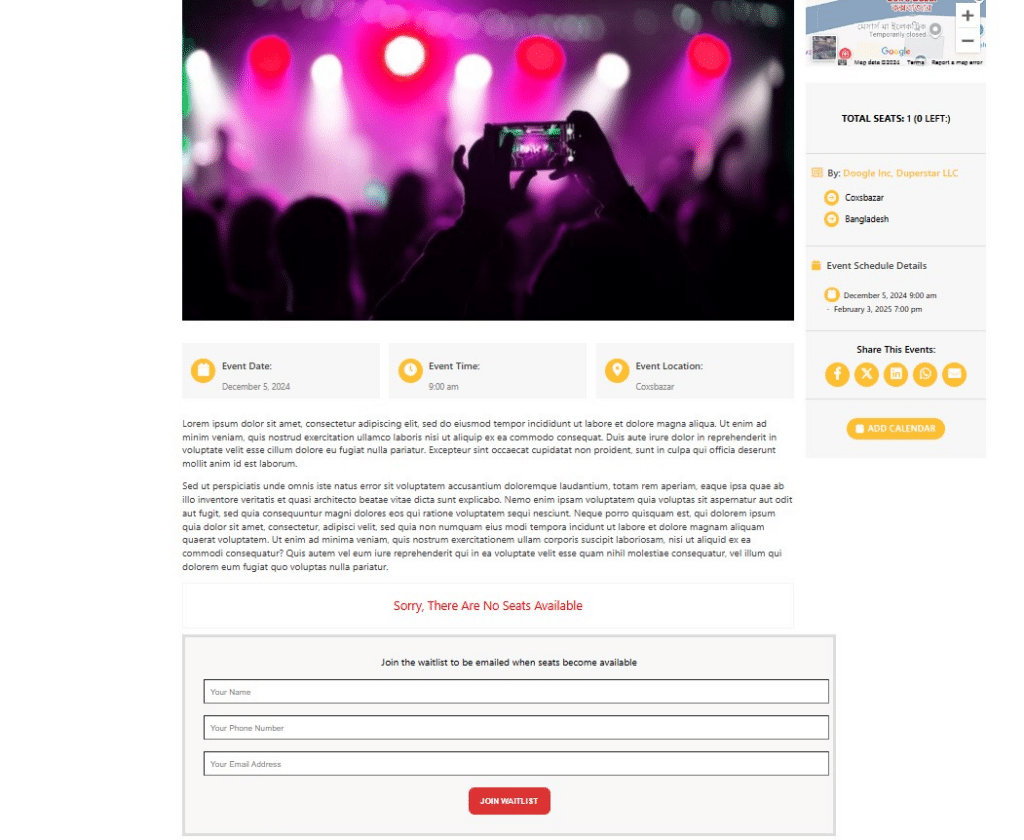
The Waitlist Addon for WooCommerce Event Manager (WpEvently) ensures you never miss a potential sale when an event sells out. It automatically activates a subscription form when tickets are unavailable, allowing interested guests to join a waiting list.
1. Solving the “Sold Out” Frustration
Without a waitlist, a full event results in lost opportunities:
- Captured Leads: Instead of users leaving your site forever, you capture their contact info and intent.
- Optimized Traffic: Ensure the marketing budget spent driving users to your page isn’t wasted on a “no-buy” experience.
- Brand Accessibility: Provide a hopeful alternative rather than a cold rejection, keeping guest sentiment high.
2. Automated Workflow: Queue to Confirmation
The addon handles the transition from “full” to “waitlisted” automatically:
- Instant Activation: When tickets hit zero, the “Book Now” button automatically switches to a “Join Waitlist” form.
- Centralized Data: Attendee details appear instantly in your backend, neatly filtered by event.
- One-Click Notifications: When a spot opens up (due to cancellations or increased capacity), admins can trigger pre-formatted emails to the queue with a single click.
- Total Control: Manually approve entries or prioritize VIPs to keep your guest list exactly how you want it.
3. Revenue & Growth Opportunities
A waitlist is a powerful tool for maximizing your ROI:
- 100% Capacity Guarantee: Fill last-minute “ghost” seats instantly to ensure no revenue is left on the table.
- Market Validation: Use waitlist length to decide if you should add a second session or move to a larger venue.
- Targeted Marketing: Even if they don’t get in this time, you now have a “warm lead” list for your next event launch.
Add-On 10: Event Seat Plan Add-On
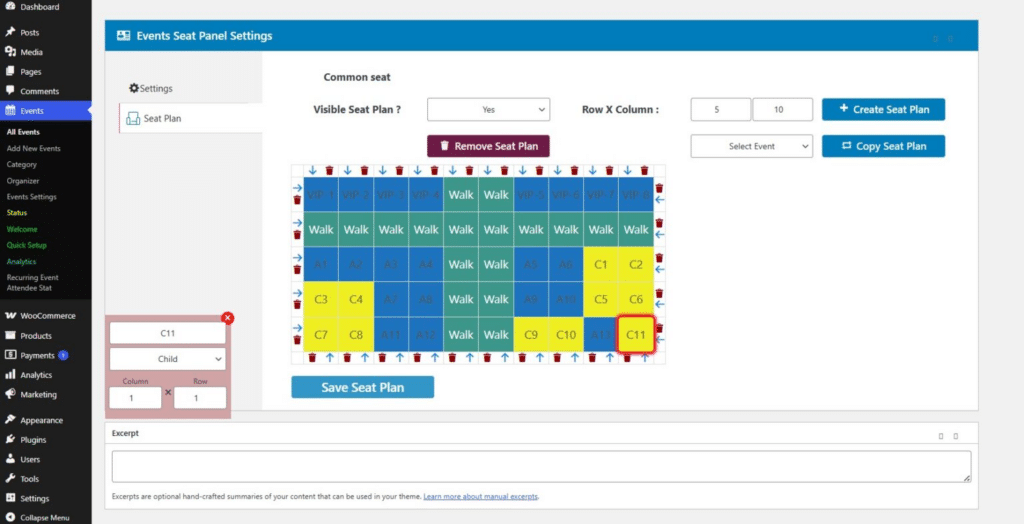
The Seat Plan Addon for WooCommerce Event Manager allows you to move beyond general admission by offering interactive, visual seat mapping. Attendees can pick their exact spot, ensuring comfort and transparency during the booking process.
1. Why Reserved Seating Matters
High-value events require organized layouts to ensure a premium experience:
- Theaters & Cinemas: Guarantees perfect sightlines to the stage or screen.
- Dining & Banquets: Essential for managing table assignments at weddings, galas, or corporate dinners.
- Conferences: Allows you to clearly separate “VIP” front-row access from standard seating.
- Fixed Venues: Prevents overcrowding and ensures every guest has a designated spot.
2. The Visual Selection Experience
The addon provides a seamless, “what-you-see-is-what-you-get” interface:
- Interactive Venue Map: Attendees see a bird’s-eye view of your space and click individual icons to pick their seats.
- Real-Time Status: Seats are color-coded by availability; occupied seats are instantly greyed out to prevent double-bookings.
- Hover Details: Users can instantly see the row number, seat number, and price just by hovering over a seat.
- Mobile Optimized: The responsive map allows guests to pinch-to-zoom and select seats easily on any device.
3. Key Benefits
- For Attendees: Choose the “best” seat (near exits or front row) and book adjacent seats for groups easily.
- For Organizers: Maximize revenue by charging premium prices for VIP sections and eliminate the “mad dash” for seats on event day.
Add-On 11: Membership Price Add-On
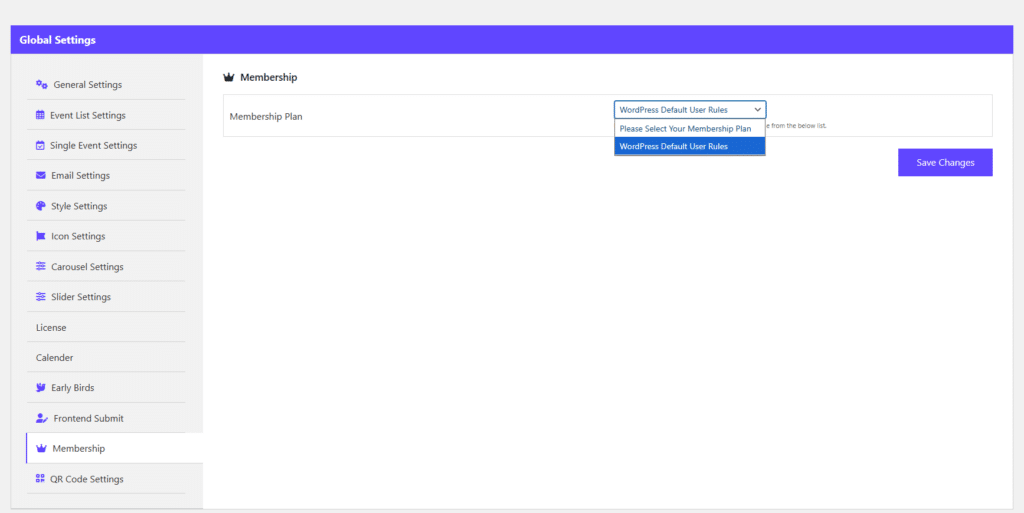
The Membership Price Addon for WooCommerce Event Manager is designed to reward your community by offering tiered ticket pricing based on a user’s membership level or WordPress role. This automation ensures that your most loyal followers always get the best deal.
1. Targeted Pricing Tiers
Create a multi-layered pricing structure within a single event to incentivize different segments:
- VIP Members: Offer deep discounts to high-tier subscribers (e.g., Gold or Platinum) to reinforce membership value.
- Strategic Partners: Provide exclusive rates for corporate sponsors or partners without needing public coupon codes.
- Community Groups: Reward specific groups like students, local residents, or volunteers with discounted pricing visible only to them.
2. Role-Based Pricing Logic
The addon uses “Smart Identification” to recognize users the moment they visit your event page:
- Automatic Detection: The system checks the user’s WordPress Role or WooCommerce Membership Tier instantly upon login.
- Dynamic Price Swapping: The standard public price is automatically replaced by the member-only rate, removing the need for manual codes.
- Restricted Visibility: You can hide specific ticket types from the general public, making them visible only to authorized roles.
- Tiered Discounts: Set unique prices for different roles—for example, a “Silver Member” gets 10% off while a “Gold Member” gets 25%.
3. Strategic Advantages
- Drive Registrations: Use exclusive pricing as a lead magnet to encourage casual visitors to create an account.
- Eliminate Coupon Friction: Reduce support requests by automating discounts natively through the user’s login.
- Actionable Insights: Identify which membership tiers are your most active attendees to better tailor future marketing.
Add-On 12: Event Duplicator Add-On
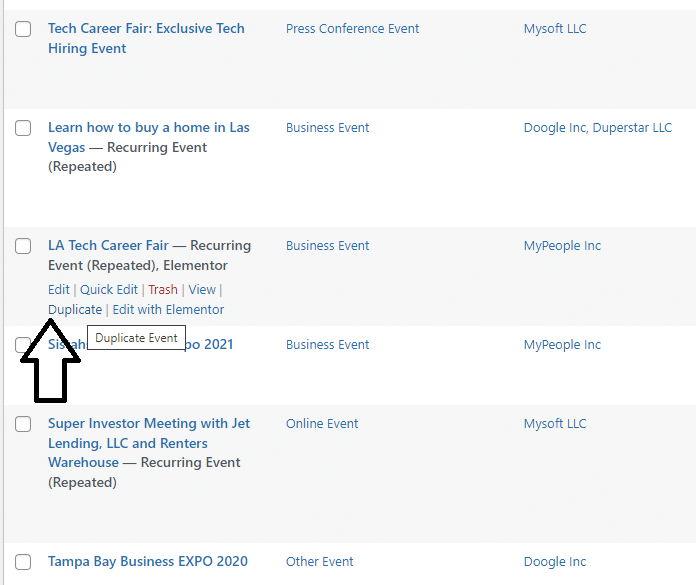
The Event Duplicator Addon is a straightforward productivity tool that integrates directly into the WooCommerce Event Manager (WpEvently). Its primary function is to allow organizers to clone existing events to save time on setup and data entry.
1. The Challenge: Manual Data Entry
Hosting weekly or monthly events often leads to tedious, repetitive tasks:
- Time Sink: Re-typing descriptions, speaker bios, and venue details for every new session is inefficient.
- Complexity: Manually rebuilding multiple ticket tiers (Early Bird, VIP, Member) for every event is prone to errors.
- Inconsistency: It’s easy to overlook specific settings, like custom registration forms or PDF ticket layouts, when starting from zero.
2. The Duplication Workflow: Clone in Seconds
The addon turns your best events into “blueprints” with a simple 3-step process:
- One-Click Duplicate: Hover over any event in your dashboard and click the “Duplicate” button.
- Instant Draft: The system creates an exact replica—including all ticket tiers and pricing—saved as a Draft.
- Quick Update: Simply swap out the new date, time, or guest speaker, and hit Publish. Your event is ready for bookings in under a minute.
3. Strategic Advantages
- Flawless Consistency: Maintain a professional, uniform look across all events without manual effort.
- Template Strategy: Keep a “Master Template” as a draft to use as a permanent starting point for all future launches.
- Work on What Matters: Spend less time on backend administration and more time on marketing and attendee engagement.
Add-On 13: Event Coupon Code Add-On
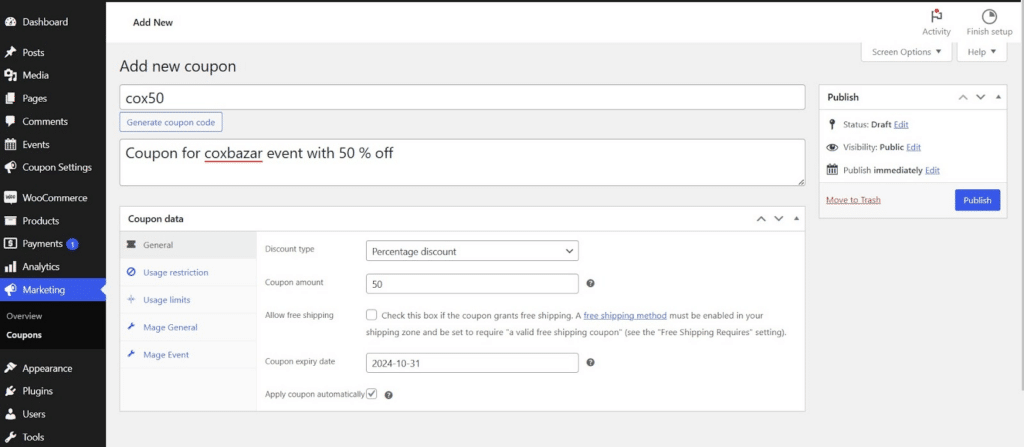
The Coupon Code Addon for WooCommerce Event Manager is designed to help you drive ticket sales and maximize revenue through flexible, event-specific discounts. It gives you precise control over how and when coupons are used.
1. Solving Event Marketing Challenges
Since tickets lose all value once an event starts, coupons help manage inventory lifecycle:
- Early Momentum: Use “Early Bird” codes to secure upfront revenue and prove event viability.
- Last-Minute Fills: Launch “Flash Sales” to quickly sell remaining seats as the event date approaches.
- Recover Lost Sales: Target hesitant visitors with small discounts to reduce cart abandonment.
- Track ROI: Assign unique codes to different platforms (e.g.,
FB20,IG20) to see exactly which channel drives the most sales.
2. Campaigns & Strategic Partnerships
Expand your reach by offering specialized codes to partners and influencers:
- Speaker & Influencer Perks: Give guests a personalized code (e.g.,
SPEAKER15) to share, incentivizing them to promote your event. - Corporate Deals: Provide partners or sponsors with “Partner Codes” to offer as exclusive employee benefits.
- Group Incentives: Use “BOGO” or group-pack discounts to encourage attendees to bring friends and coworkers.
- Loyalty Rewards: Send “Welcome Back” codes to past attendees via newsletters to build a recurring community.
3. Smart Control Features
- Usage Limits: Protect your margins by capping a code to a specific number of redemptions (e.g., first 50 buyers).
- Event Linking: Lock codes to specific events so a “Small Workshop” discount isn’t used for a “VIP Gala.”
- Automated Expiry: Set hard deadlines for “Early Bird” offers to ensure the promotion ends exactly when intended.
Add-On 14: Review And Rating Add-On
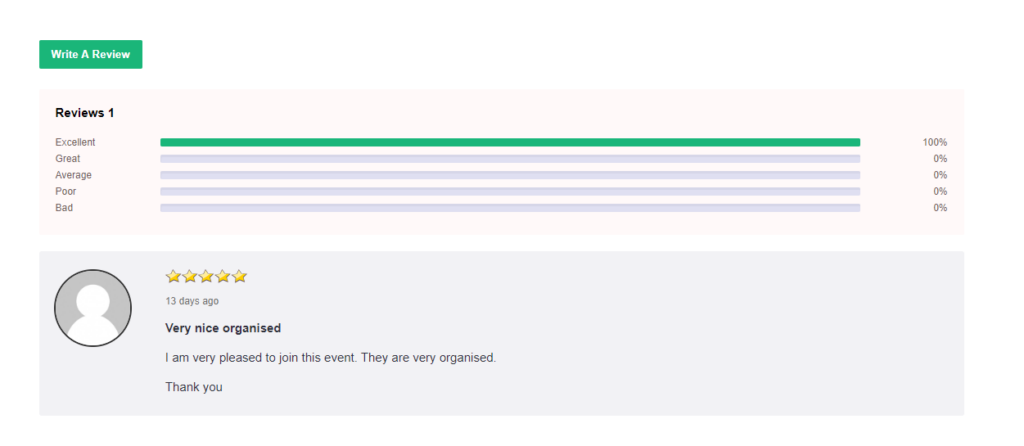
The Review and Rating Addon for WooCommerce Event Manager is a powerful tool to showcase attendee experiences. By displaying real testimonials and star ratings, you build immediate credibility for your events, helping potential attendees feel confident in their purchase and significantly boosting ticket sales.
1. Why Post-Event Engagement Matters
Success depends on maintaining a relationship with attendees after the event ends:
- Extend Event Life: Reviews keep the conversation active, ensuring your event stays relevant long after the doors close.
- Build Brand Advocates: Giving attendees a voice turns them into loyal fans who actively recommend your events to others.
- Convert Hesitant Buyers: Most people check ratings before purchasing. A high star rating acts as a powerful psychological trigger that reduces buyer friction.
2. Improving Future Events with Data
Reviews provide a direct roadmap for evolving your event strategy:
- Identify Highlights: If attendees consistently praise a specific speaker or feature, you know exactly where to reinvest your budget.
- Fix Pain Points: Hidden logistical issues—like long check-in lines or audio problems—surface in feedback, allowing you to fix them for next time.
- Crowdsource Content: Attendee suggestions help you plan future topics based on actual market demand rather than guesswork.
3. Key Management Features
- Admin Moderation: All reviews enter a “Pending” list, allowing you to filter spam and ensure your page remains professional.
- Verified Reviews: Restrict submissions to confirmed ticket holders to ensure 100% authentic feedback.
- Visual Average Ratings: Automatically calculate and display a “Quality Score” on your event listings for instant credibility.
Add-On 15: Mage WP Login Page Designer
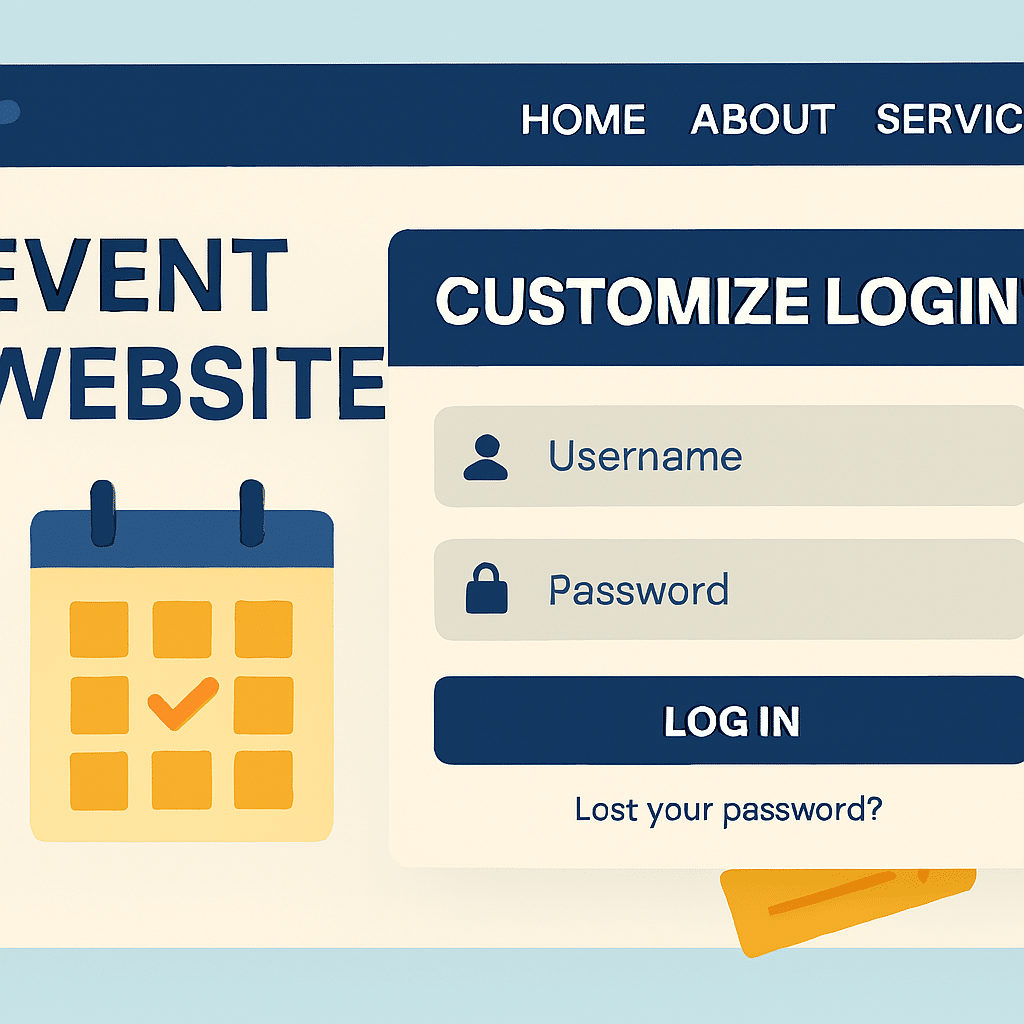
The Mage WP Login Page Designer is a lightweight yet powerful tool that allows you to replace the standard, generic WordPress login screen with a fully branded, professional experience. It ensures that every touchpoint from login to registration aligns perfectly with your website’s identity.
How Event Professionals Combine Multiple Add-Ons
In the real world, professionals rarely use just one add-on alone. For example, a music festival organizer might combine the Global Quantity Add-on to manage total venue capacity across all stages, while using the QR Code Add-on for seamless entry and Email Reminders to share login details for virtual sessions.
Conclusion: Turn Your Website into a Professional Event Platform
WpEvently is more than just a plugin; it is a scalable solution that supports the growth of your event business. Whether you are starting with the robust free version or unlocking advanced features with WpEvently Pro (starting at $59/year), these add-ons ensure your platform can handle any challenge.